¶ ProxLogs User Manual - Mobile Loggers
¶ Introduction
https://www.youtu.be/FaxyrsLvZvk
Mobile Loggers are the heart of the ProxLogs system. These compact, low-power devices are equipped with Bluetooth Low Energy (BLE) technology, designed to track and store proximity and movement data.
¶ Key Features
¶ Compact Size
Designed for easy attachment to wildlife or assets, the mobile loggers are small enough to be unobtrusive yet robust enough to withstand various environmental conditions.
¶ Multi-User Support
The mobile loggers can be managed via a dedicated mobile app, supporting sharing with up to 100 users for collaborative projects. Only one user can control a logger at a time. When a user is configuring/editing a logger it will temporarily dissapear from the app for others, until the controlling user explicitly disconnects with it, or force closes the app. This often leads to people thinking a logger has died, while somebody is still connected using the app in the background.
¶ Operation Modes
Mobile loggers have multiple modes of operation, each optimized for specific tracking scenarios:
- Advertising Only Mode: Minimal power consumption, awaiting commands, can be tracked by other loggers/gateways/users
- Scanning Mode: Actively collecting and storing data. This logger can also be tracked by other loggers/gateways/users
- Shutdown Mode: Lowest power consumption. Completely shutdown and requires to be inserted in a powered charger to "wake up" again, after which it will resume normal operation.
Refer to the [[Mobile app]] to learn more about these modes and how to switch between them.
¶ Charging
WARNING: Never leave the loggers charging unsupervised. While both the chargers and the batteries have built-in protection against a range of dangerous situations, the batteries are still lithium polymer based which in rare cases can overheat. When observing any smoke or when observing an odd-smell, immedeatly unplug the charger. Make sure to read the following instructions carefully to avoid dangerous situations.
Mobile loggers can be charged using the 2 and 10 bay chargers provided. Always ensure the loggers are fully charged before deploying them in the field.
¶ How to insert a logger into the charger
- Pull back an empty charging bay until the plastic insert hits the back of the charger.
- Put the logger with the three copper charging pads towards the middle in the charger, in the slot that has been cut out. Keep holding the insert back until the logger is fully inserted until the white dotted line is flush with the insert. Make sure the line is level with the insert.
- Slowly release the insert into the three copper springed pins. Make sure the insert travels all the way back into the pins.
- Check for a solid red light appearing next to the logger. Any blinking means the logger is not properly inserted or the insert is not all the way against the pins.
¶ How to remove a logger from the charger.
- Pull the insert holding a logger back. The pressure from the pins should be completely gone from the logger.
- Remove the logger from the insert.
¶ Meaning of the red LED lights
- Solid red light: Charging is in progress
- No red light at all: Charging has finished
- Fast blinking light: No logger detected in bay.
- Any blinking slower than an empty bay: Battery fault. if this happens in multiple bays, assume that the battery is damaged and should not be used/recharged.
¶ Video tutorial
¶ Sealing
Out of the box, the loggers are NOT waterproof or weatherproof. Depending on the animal-species, different kinds of sealents should be used. When sealing the logger, ensure that the charging port (below in blue) is not covered in any permanent sealing solution. Non-permanent sealants such as plastidip or other spray on/coatable rubbers work fine.
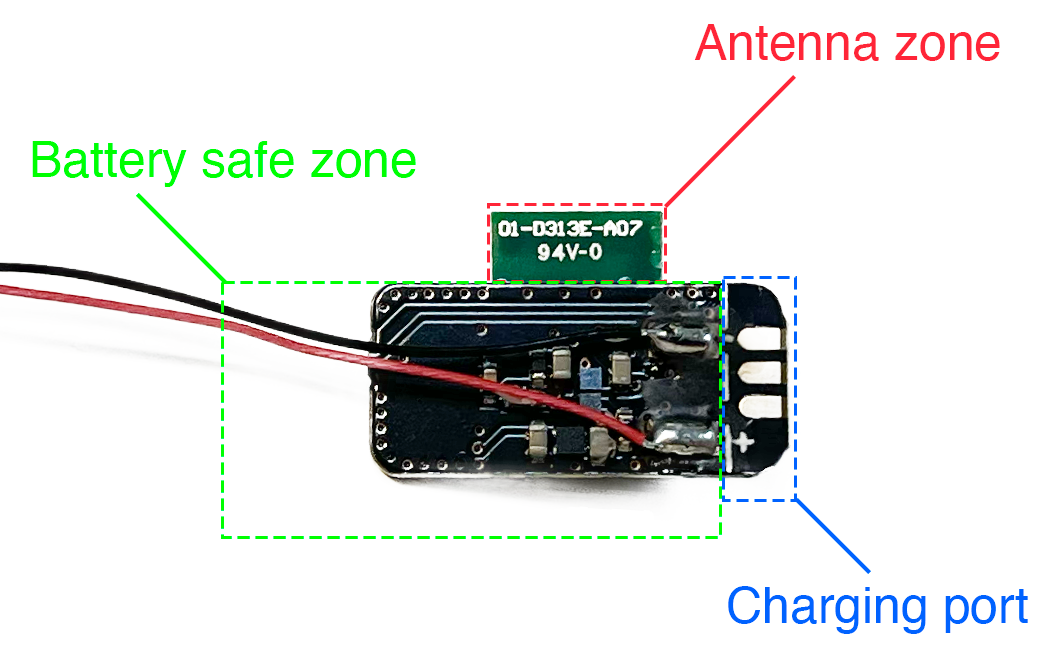
People have used a 2K PU-epoxy from Wagner which we've tested ourselves and seems to provide adequate hardness for most species while not causing any interruptions to the signal of the logger. While we can't vouch for other brands, we expect that similar epoxies have similar properties. It is a poly-urethane epoxy without any fillers.
¶ Coating/potting checklist
- Coating should be non-conductive
- Coating should not cause a severe degradation of the signal
¶ Battery placement
It is important that the battery is not placed beneath the ANTENNA ZONE or your logger will not perform well. The battery can be attached to anywhere in the BATTERY SAFE ZONE. It is not advisable to attach the battery near the charging port as this will make it incredibly difficult to charge.
¶ Example placement
In both of these examples, the battery has been affixed to the logger using a drop of glue from a glue gun. This is one of the ways how you can affix the battery before coating/potting.
- GOOD PLACEMENT: The battery is not placed near/under the antenna zone. There is adequate room left around the charging port to insert it into the charger. While not a requirement, it is also tucked neatly below the charger, forming a compact package. The battery can also be away from the logger, as long as the wires are somehow protected.
- BAD PLACEMENT: Even though the battery is tucked under the logger nicely, it is UNDER THE ANTENNA which is BAD. This logger will have a severely degraded signal strength. It is also partly over the charging-port line, which will also complicate charging.
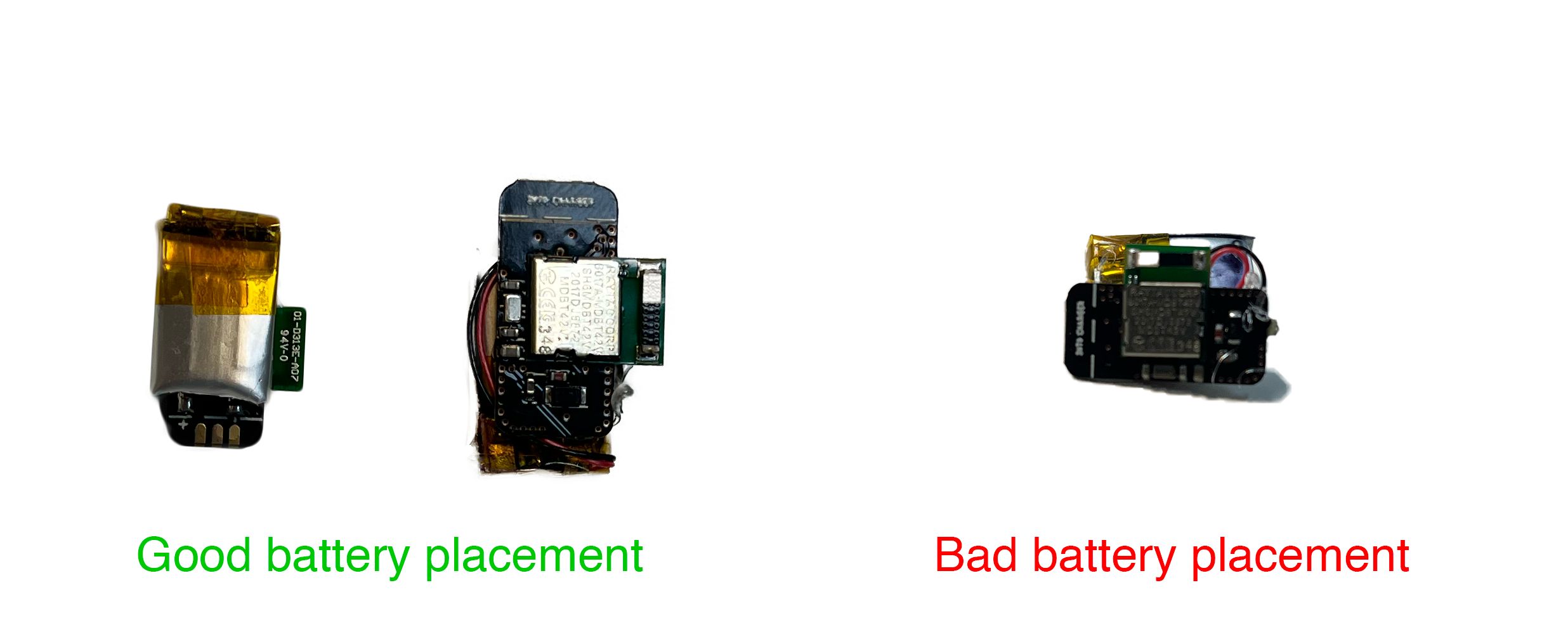
IMPORTANT: Even though affixing the battery is part of the setup process, the logger still needs to be protected using a strong coating or epoxy before it can be used in field conditions.
¶ Expected ranges
| Test | Max distance | Substrate | Boosted? |
|---|---|---|---|
| Mobile logger to mobile logger | 180cm | On the ground | Unboosted |
| Mobile logger to mobile logger | 330 cm | On the ground | Boosted |
| Mobile logger to stationary | 20m | Mob logger on the ground | Unboosted |
| Mobile logger to stationary | 20m+ | Mobile logger on the ground | Boosted |
| Gateway to mobile logger | 40m | Mobile logger on the ground | Unboosted |
| Gateway to mobile logger | 50m+ | Mobile logger on the ground | Boosted |
| Gateway to stationary logger | 60m+ | Stationary logger on pole | Unboosted |
| Gateway to buried logger | Above | Buried at depth of 27cm | Unboosted |
| Gateway to buried logger | 1.5m | Buried at depth of 27cm | Boosted |
| Gateway to buried logger | 3m | Buried at depth of 14cm | Boosted |
| Gateway to buried logger | 6m | Buried at depth of 5cm | Unboosted |
| Gateway to buried logger | 15m | Buried at depth of 5cm | Boosted |
¶ Best Practices
- Ensure that the loggers are adequately sealed when deploying in wet or dusty environments.
- Periodically check the battery status via the mobile app or by checking the encounter log on the gateway.
- Keep the firmware updated to the latest version for optimal performance. For security reasons, always read the update notes accompanied with firmware updates. Some firmware updates are NOT backwards compatible and require all devices to be updated.
¶ Troubleshooting
-
I can't see one or multiple loggers in the app
Possible causes:- Loggers are shipped in Shutdown mode, which disables them until they are charged. When they are put in the charger while the charger is powered and then removed, they should power up.
- The logger is out of charge. Charge the logger up for a couple of minutes by leaving it in the charger.
- The logger is already connected to another device. This can be either another phone or a gateway. Make sure to force close the app on nearby phones that have the ProxLogs app installed and try powering off nearby gateways.
-
Sometimes the logger is missing/not hearing another nearby logger
Occasional misses are expected, especially if there's heavy WiFi-communication nearby. If you are seeing a really high amount of misses, verify if all loggers have the same advertising interval in the app. The advertising interval shown in the app has to be equal in the whole system. -
The range of my logger isn't what I'm expecting it to be
Verify the placement of any metal, or the battery underneath the antenna. Make sure that you take it out of the bags they come with. These are anti-static bags and block most of the signal. -
There is white discharge on my new logger and it has a peculiar odor.
This is most likely due to the protective coating that was applied shortly before shipping. We spray the loggers with an acryl-coating to make sure it is more resilient against humidity. The odor should dissapear after airing out the logger out of the bag.
Check if the battery is not punctured. If there is an indication that the battery is punctured, immedeatly stop using the logger and do not charge it. Refer to your local guidelines on disposing eletronics with damaged lithium batteries. -
One of my loggers is not charging. The light keeps flashing even though it is inserted correctly in the charger
Sometimes, oils and other products can coat the charging pads. Lightly scratching the pads or applying rubbing alcohol and wiping the port thoroughly usually resolves this issue. -
Is it okay to let my logger fully discharge or should I charge it before it completely runs out?
It is okay to let your logger fully discharge, but charging it before it falls below 10% will increase the longevity of the battery. If you can easily prevent it, we suggest you to recharge the logger. If the logger is going to be stored for a prolonged amount of time, we recommend charging the logger up to 60% and putting it into shutdown-mode before storing it in it's original anti-static bag alongside a dessicant pouch.
For further support or inquiries, consult the FAQs section or contact IoSA bv customer service.